

API keys and scopes
REST requires an API key (psa_), not an interactive session. OAuth access
tokens (pso_) issued to MCP clients work only with MCP; the only OAuth tokens
REST accepts are those issued to the Zapier integration.
Personal API tokens are no longer supported.
Authorization: Bearer <manual-automation-token>Credential reference
Section titled “Credential reference”| Prefix | Credential | Lifetime | Works with |
|---|---|---|---|
psa_ |
API key | 90 days maximum; rotation renews | REST /api/v1 and /mcp |
pso_ |
OAuth access token | 15 minutes | MCP clients: MCP only. Zapier: REST only |
psr_ |
OAuth refresh token (rotates on use) | MCP connections last 90 days; Zapier connections expire after 90 days unused | Refreshing that connection’s access token |
Sending an MCP client’s OAuth token to REST returns 401. Use an API key for REST.
A 403 on a valid key usually means a missing scope or insufficient role.
Create, rotate and revoke an API key
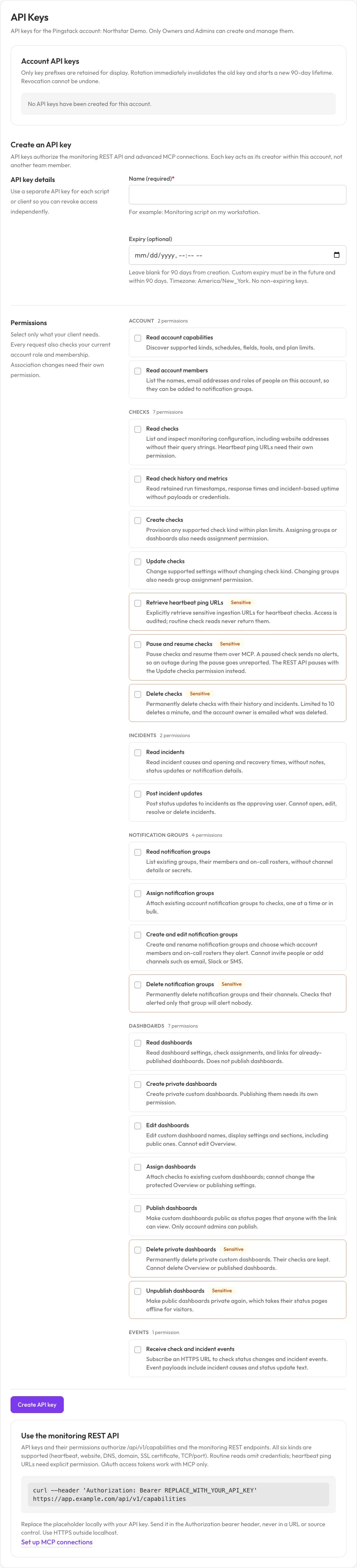
Section titled “Create, rotate and revoke an API key”- As an Owner or Admin, select the account and open Settings → Developer → API Keys.
- Name the key for its integration or environment.
- Select the minimum required scopes and an expiry within 90 days. Permissions are grouped by area, and the sensitive ones sit last in each group with a Sensitive badge.
- Create it and copy the token shown once to private configuration.
- Verify capabilities or another authorized read.
API keys default to 90-day expiry. Rotation issues a replacement token, invalidates the old one and renews expiry to 90 days. Revocation disables the grant. OAuth connections are disconnected, not manually rotated.
Tokens bind to both the issuing user and account. Effective permission is the intersection of selected scopes, current membership/role and grant validity. A role change or loss of membership can remove access immediately.
Scopes
Section titled “Scopes”| Scope | Allows | Current role capability |
|---|---|---|
account:read |
Capabilities and billing guidance | View monitoring |
checks:read |
List/read safe check configuration | View monitoring |
checks:history |
History, runs, metrics and uptime | View monitoring |
incidents:read |
Incident causes and timing | View monitoring |
notification_groups:read |
List groups with their members and rosters, and list rosters | View monitoring |
members:read |
List account members with names, email addresses and roles | Manage alerts |
dashboards:read |
List/read dashboards and existing public URLs of already-published dashboards | View monitoring |
checks:create |
Create supported checks | Manage checks |
checks:update |
Update supported check fields | Manage checks |
checks:ping_urls |
Sensitive. Retrieve secret heartbeat URLs | Read operational credentials |
checks:pause |
Sensitive. Pause and resume checks over MCP; REST pauses with checks:update |
Manage checks |
checks:delete |
Sensitive. Permanently delete checks | Manage checks |
notification_groups:assign |
Assign existing groups to checks, one at a time or in bulk | Manage alerts |
notification_groups:manage |
Create and rename groups and set their members and rosters | Manage alerts |
notification_groups:delete |
Sensitive. Permanently delete groups | Manage alerts |
dashboards:create |
Create private custom dashboards | Manage dashboards |
dashboards:update |
Update custom dashboards and their sections | Manage dashboards |
dashboards:assign |
Attach/detach/reorder checks | Manage dashboards |
dashboards:publish |
Publish custom dashboards as status pages | Publish status pages (Admin) |
dashboards:unpublish |
Sensitive. Take a published dashboard offline | Publish status pages (Admin) |
dashboards:delete |
Sensitive. Permanently delete private custom dashboards | Manage dashboards |
incidents:update |
Post incident status updates | Manage incident updates |
webhooks:manage |
Create/delete event subscriptions and read sample events | View monitoring |
Read monitoring is available to all customer roles. Operational credential and write capabilities are available to Editor/Admin; see roles. Only Owners and Admins can manage these connections in settings.
webhooks:manage event payloads include status update text, which incident
reads omit. webhooks:manage is REST-only; MCP clients can’t request it during
browser sign-in.
Sensitive permissions
Section titled “Sensitive permissions”Six permissions are sensitive: checks:ping_urls, checks:pause,
checks:delete, dashboards:delete, notification_groups:delete and
dashboards:unpublish. Ping URLs are credentials. Pausing or deleting can hide
an outage, and unpublishing takes a live status page offline. On the API Keys
page and the browser sign-in consent screen they start unticked and carry a
Sensitive badge.
Deletes are limited to 10 a minute per key or connection, and the account owner is emailed what was deleted. See delete limits.
Supplying an association field requires its assignment scope even when you already have permission to create/update the check. Leave the sensitive permissions off for clients that only need health summaries.
Use HTTPS. A token in a query string is not supported authentication and is liable to leak in URLs and logs.