

Route alerts with notification groups
A notification group connects checks to delivery channels and people. Editors and Admins can manage groups and assignments.
- Select the account and open Notification groups.
- Create a uniquely named group, such as
Production services. - Add channels, account members or rosters.
- Configure schedules for member/roster assignments if they should not receive alerts all the time.
- Edit each relevant check and select the group, then save.
- Verify a controlled incident and recovery.
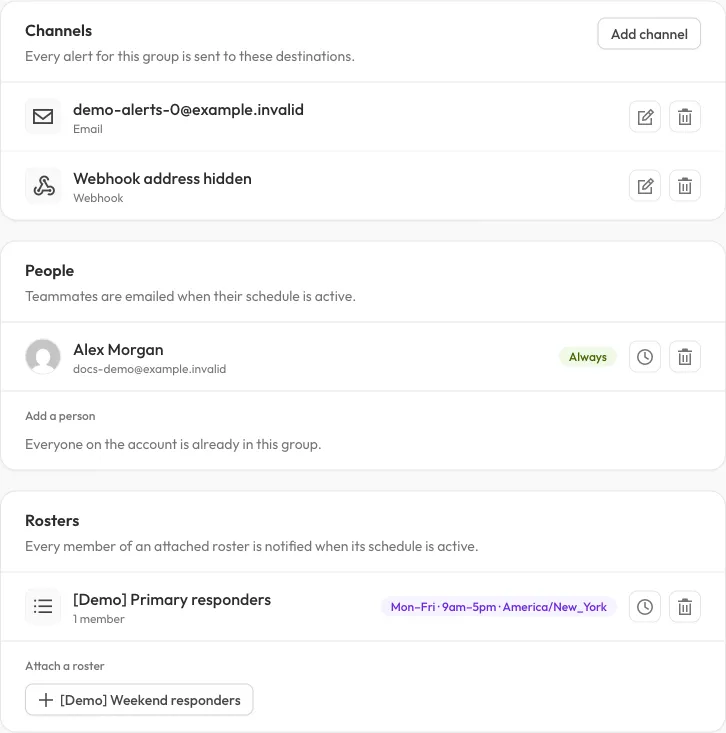
A demo group combines channels, a direct member and a scheduled roster. Recipients are fictional; the webhook address is hidden.
A group without delivery channels or eligible recipients cannot deliver a useful alert. A populated group that is not assigned to a check also receives no alerts from that check.
Recipient selection
Section titled “Recipient selection”Notification channels belong to their group. Direct members and roster members receive alerts only when their group assignment’s schedule matches. Recipient users are deduplicated across direct/roster membership and groups. The same user appearing in several places does not create a separate user delivery for every membership.
Channel recipients and user recipients are distinct. Adding a group email channel and a member with the same address can still result in separate delivery paths; deduplication is not an email-address-wide promise.
Editing or deleting a group affects its check assignments and channels. Confirm the affected checks before removing a group’s delivery path.
The API can list groups and assign existing groups to checks, but cannot create channels or manage recipients. See API groups.